
この記事は、インテル® デベロッパー・ゾーンに公開されている「Gentle Introduction to PyDAAL: Vol 3 Analytics Model Building and Deployment」(https://software.intel.com/en-us/articles/gentle-introduction-to-pydaal-vol-3-of-3-analytics-model-building-and-deployment) の日本語参考訳です。
この記事の PDF 版はこちらからご利用になれます。
前のパート: パート 2: 数値テーブルの基本操作
超入門シリーズのパート 1 およびパート 2 では、インテル® データ・アナリティクス・ライブラリー (インテル® DAAL) のカスタムデータ構造の基本と基本的な操作について説明しました。パート 3 では、インテル® DAAL のアルゴリズム・コンポーネントに注目します。コンポーネントのデータ管理要素は、マシン・ラーニング・モデルの解析および作成に活用されます。
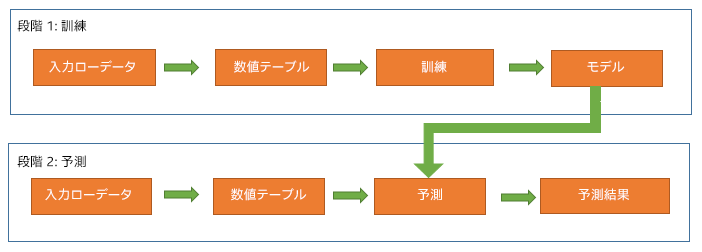
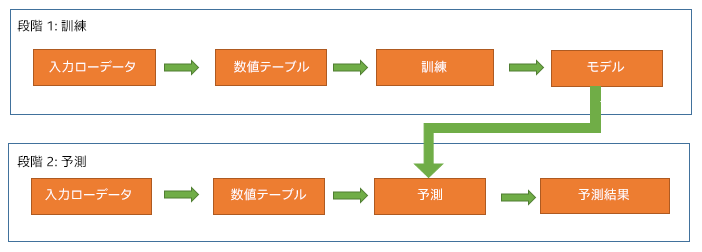
インテル® DAAL には、分類、回帰、推薦システム、ニューラル・ネットワークを含む解析モデルを作成するため、広範なマシン・ラーニング・アルゴリズムの構築に利用できるクラスが用意されています。インテル® DAAL のモデルの構築は、訓練と予測の 2 つに分かれています。この分離により、ユーザーは、モデルを配備するときに予測に必要な項目のみを格納して転送することができます。一般的なマシンラーニングのワークフローには次の段階が含まれます。
- 訓練段階 – ターゲット変数に従ってデータ特徴の動作をマップする、入力データのパターンの識別を含みます。
- 予測段階 – 新しいデータセットに訓練済みモデルを使用します。
インテル® DAAL には、個別のクラスの形式で訓練済みモデルのパフォーマンスを評価して、標準品質メトリックを計算するオンボード・モデル・スコアリングも含まれています。構築された解析モデルの種類に基づいて、さまざまなセットの品質メトリクスがレポートされます。
超入門シリーズ
- パート 1: データ構造 – インテル® DAAL のデータ管理コンポーネントとカスタムデータ構造 (数値テーブルとデータ辞書) をサンプルコードを使用して紹介します。
- パート 2: 数値テーブルの基本操作 – インテル® DAAL のカスタムデータ構造 (数値テーブルとデータ辞書) で実行可能な操作について、サンプルコードを使用して紹介します。
- パート 3: 分析モデルの構築とデプロイメント – バッチ処理でシリアル化されたデプロイメントを利用するインテル® DAAL の分析モデリングと評価プロセスを紹介します。
- パート 4: 分散処理とオンライン処理 – 大規模なデータやストリーミング・データのデータ分析やモデル・フィッティングをサポートするインテル® DAAL の高度な処理モード (分散とオンライン) を紹介します。
インテル® Distribution for Python* とインテル® DAAL のインストール
この記事のデモには、インテル® Distribution for Python* およびインテル® DAAL (Anaconda* Cloud から無料で入手可能) が必要です (インテル® Parallel Studio XE 2019 ではパッケージに同梱されています)。
- 必要なパッケージをインストールするため、インテル® Distribution for Python* の完全な環境をインストールします。
conda create -n IDP -c intel intelpython3_full python=3.6
- インテル® Distribution for Python* 環境をアクティベートします。
source activate IDP
または
activate IDP
詳細は、インストール・オプションとインテルのパッケージの https://software.intel.com/en-us/articles/complete-list-of-packages-for-the-intel-distribution-for-python を参照してください。
解析モデル
1. PyDAAL によるバッチ学習
インテル® DAAL には、解析モデルの構築とデプロイメント・プロセスの次の段階をサポートするクラスが含まれています。
1.1 解析モデルの訓練と予測のワークフロー
1.2 PyDAAL 解析モデルによる構築と予測
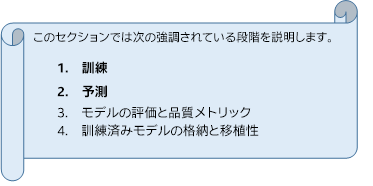
前述したように、インテル® DAAL のモデル構築は 2 つの異なる段階と 2 つの関連するクラス (“training” および “prediction”) に分かれています。
訓練段階は通常、広範囲メモリー・フットプリントと呼ばれる、非常に大規模なデータセットの複雑な計算を含みます。インテル® DAAL の 2 つのクラスを利用することで、ユーザーは高性能なマシン上で訓練段階を実行し、通常のマシンで予測段階 (オプション) を実行することができます。ユーザーは、予測段階で必要な訓練段階の結果のみを格納して転送します。
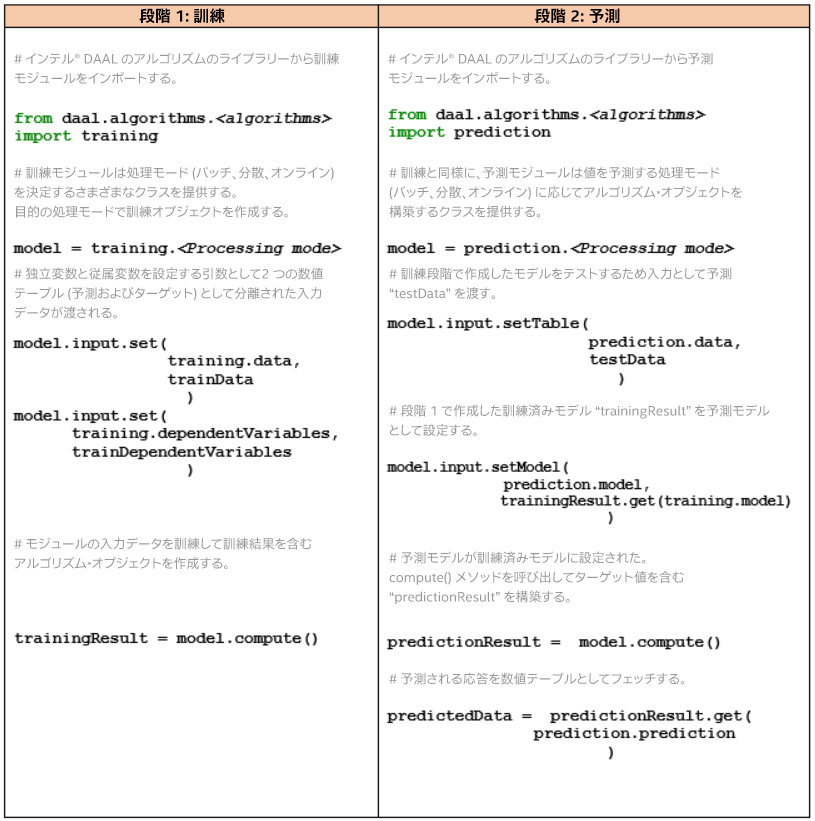
以下のように、モデルの構築プロセスの初めに、各段階 (訓練および予測) で 2 つ、計 4 つの数値テーブルが作成されます。
| 段階 | 数値テーブル | 説明 |
|---|---|---|
| 訓練 | trainData | 特徴値/予測を含みます。 |
| 訓練 | trainDependentVariables | ターゲット値 (ラベル/応答など) を含みます。 |
| 予測 | testData | テストデータの特徴値/予測を含みます。 |
| 予測 | testGroundTruth | ターゲット (ラベル/応答など) を含みます。 |
注: 数値テーブルの作成および操作の詳細は、パート 2 を参照してください。
次の表は、解析モデルの構築プロセスの訓練段階と予測段階の高レベルの概要を示しています。
ヘルパー関数: 線形回帰
以下のコードをコピーしてユーザーのスクリプトに貼り付け、特定のユースケースに合わせて変更できます。以下のヘルパー関数ブロックを使用して、インテル® DAAL の訓練段階と予測段階を自動化することができます。ヘルパー関数の実装方法はコード例を参照してください。
'''
training() function
-----------------
Arguments:
        train data of type numeric table, train dependent values of type numeric table
Returns:
        training results object
'''
def training(trainData,trainDependentVariables):
    from daal.algorithms.linear_regression import training
    algorithm = training.Batch ()
    # Pass a training data set and dependent values to the algorithm
    algorithm.input.set (training.data, trainData)
    algorithm.input.set (training.dependentVariables, trainDependentVariables)
    trainingResult = algorithm.compute ()
    return trainingResult

'''
prediction() function
-----------------
Arguments:
        training result object, test data of type numeric table
Returns:
        predicted responses of type numeric table
'''
def prediction(trainingResult,testData):
    from daal.algorithms.linear_regression import  prediction, training
    algorithm = prediction.Batch()
    # Pass a testing data set and the trained model to the algorithm
    algorithm.input.setTable(prediction.data, testData)
    algorithm.input.setModel(prediction.model, trainingResult.get(training.model))
    predictionResult = algorithm.compute ()
    predictedResponses = predictionResult.get(prediction.prediction)
    return predictedResponses
コードを使用するには、ヘルパー関数のブロックをコピーして training() および prediction() メソッドを呼び出します。
使用例: 線形回帰
以下のコード例は、上記の訓練および予測ヘルパー関数を実装しています。
#import required modules
from daal.data_management import HomogenNumericTable
import numpy as np
from utils import printNumericTable
seeded = np.random.RandomState (42)

#set up train and test numeric tables
trainData =HomogenNumericTable(seeded.rand(200,10))
trainDependentVariables = HomogenNumericTable(seeded.rand (200, 2))
testData =HomogenNumericTable(seeded.rand(50,10))
testGroundTruth = HomogenNumericTable(seeded.rand (50, 2))

#--------------
#Training Stage
#--------------
trainingResult = training(trainData,trainDependentVariables)
#--------------
#Prediction Stage
#--------------
predictionResult = prediction(trainingResult, testData)

#Print and compare results
printNumericTable (predictionResult, "Linear Regression prediction results: (first 10 rows):", 10)
printNumericTable (testGroundTruth, "Ground truth (first 10 rows):", 10)
注: ヘルパー関数のクラスは、モデルの構築とデプロイメント・プロセスのさまざまな段階を実行する一般的なアルゴリズム向けに、インテル® DAAL の低水準 API を使用して作成されています。これらのクラスはメソッドとして訓練と予測段階を含み、daaltces の GitHub* リポジトリー (英語) から入手できます。これらの関数は、使用例で示しているように、各段階で渡す入力引数のみ必要です。
1.3 訓練済みモデルの評価と品質メトリック
インテル® DAAL には、訓練済みモデルの品質を測定するため、二項分類、多クラス分類および回帰アルゴリズム向けの品質メトリック・クラスが用意されています。異なる種類の解析モデル向けに、インテル® DAAL の品質メトリック・ライブラリーは、さまざまな標準メトリックを計算します。
二項分類
正解率、適合率、再現率、F1 値、特異度、AUC
表記および定義の詳細は、https://software.intel.com/en-us/daal-programming-guide を参照してください。
多クラス分類
平均正解率、不正解率、マイクロ適合率 (適合率 μ)、マイクロ再現率 (再現率 μ)、マイクロ F 値 (F 値 μ)、マクロ適合率 (適合率 M)、マクロ再現率 (再現率 M)、マクロ F 値 (F 値 M)
表記および定義の詳細は、https://software.intel.com/en-us/daal-programming-guide を参照してください。
回帰
回帰モデルでは、インテル® DAAL は 2 つのライブラリーを使用してメトリクスを計算します。
- 単一ベータ: 訓練済みモデルの個々のベータ係数に基づいてメトリックの結果を計算および生成します。
RMSE、分散のベクトル、分散共分散行列、Z スコア統計
- グループベータ: 訓練済みモデルのベータ係数のグループに基づいてメトリックの結果を計算および生成します。
予測応答の平均および分散、回帰平方和、残差平方和、総平方和、決定係数、F 統計量
表記および定義の詳細は、https://software.intel.com/en-us/daal-programming-guide を参照してください。
注: ヘルパー関数のクラスは、モデルの構築とデプロイメント・プロセスのさまざまな段階を実行する一般的なアルゴリズム向けに、インテル® DAAL の低水準 API を使用して作成されています。これらのクラスは品質メトリクスのメソッドを含み、daaltces の GitHub* リポジトリー (英語) から入手できます。これらの関数は、使用例で示しているように、各段階で渡す入力引数のみ必要です。
1.4 訓練済みモデルの格納と移植性
訓練済みモデルは、バイト型の NumPy* 配列にシリアル化し、インテル® DAAL のデータ・アーカイブ・クラスを使用して逆シリアル化できます。次のような操作が可能になります。
- デバイス間のデータ転送をサポートする。
- 観測の応答を予測するため、または新しい観測のセットでモデルを再訓練するために、ディスクに保存して後から復元する。
オプションで、ネットワーク・トラフィックやメモリー・フットプリントを減らすために、シリアル化されたモデルをさらに圧縮し、逆シリアル化メソッドを使用して後から展開することもできます。
インテル® DAAL でモデルの移植性を得るためのステップ
- シリアル化
- 訓練段階の結果 (trainingResults) をインテル® DAAL の入力データ・アーカイブ・オブジェクトにシリアル化します。
- 入力データ・アーカイブ・オブジェクトのサイズで、空のバイト型 NumPy* 配列オブジェクト (bufferArray) を作成します。
- 入力データ・アーカイブ・オブジェクトの内容を bufferArray に格納します。
- bufferArray を NumPy* 配列オブジェクトに圧縮します (オプション)。
- bufferArray を .npy ファイルとしてディスクに保存します (オプション)。
- 逆シリアル化
- .npy ファイルをディスクから NumPy* 配列オブジェクトにロードします (シリアル化のステップ 1e を実行した場合)。
- NumPy* 配列オブジェクトを bufferArray に展開します (シリアル化のステップ 1d を実行した場合)。
- bufferArray の内容でインテル® DAAL の出力データ・アーカイブ・オブジェクトを作成します。
- 空のオリジナルの訓練段階の結果オブジェクト (trainingResults) を作成します。
- 出力データアーカイブの内容を trainingResults に逆シリアル化します。
注: 逆シリアル化のステップ 2d で述べたように、インテル® DAAL のデータ・アーカイブ・メソッドを使用してシリアル化された訓練の結果オブジェクトを逆シリアル化するには、空のオリジナルの訓練段階の結果オブジェクトが必要です。
ヘルパー関数: 線形回帰
以下のコードをコピーしてユーザーのスクリプトに貼り付け、特定のユースケースに合わせて変更できます。以下のヘルパー関数ブロックを使用して、インテル® DAAL の線形回帰アルゴリズムのモデルの格納と移植性を自動化することができます。ヘルパー関数の実装方法はコード例を参照してください。
import numpy as np
import warnings
from daal.data_management import  (HomogenNumericTable, InputDataArchive, OutputDataArchive, \
                                   Compressor_Zlib, Decompressor_Zlib, level9, DecompressionStream, CompressionStream)
'''
Arguments: serialized numpy array
Returns Compressed numpy array
'''

def compress(arrayData):
    compressor = Compressor_Zlib ()
    compressor.parameter.gzHeader = True
    compressor.parameter.level = level9
    comprStream = CompressionStream (compressor)
    comprStream.push_back (arrayData)
    compressedData = np.empty (comprStream.getCompressedDataSize (), dtype=np.uint8)
    comprStream.copyCompressedArray (compressedData)
    return compressedData

'''
Arguments: deserialized numpy array
Returns decompressed numpy array
'''
def decompress(arrayData):
    decompressor = Decompressor_Zlib ()
    decompressor.parameter.gzHeader = True
    # Create a stream for decompression
    deComprStream = DecompressionStream (decompressor)
    # Write the compressed data to the decompression stream and decompress it
    deComprStream.push_back (arrayData)
    # Allocate memory to store the decompressed data
    bufferArray = np.empty (deComprStream.getDecompressedDataSize (), dtype=np.uint8)
    # Store the decompressed data
    deComprStream.copyDecompressedArray (bufferArray)
    return bufferArray

#-------------------
#***Serialization***
#-------------------
'''
Method 1:
    Arguments: data(type nT/model)
    Returns  dictionary with serailized array (type object) and object Information (type string)
Method 2:
    Arguments: data(type nT/model), fileName(.npy file to save serialized array to disk)
    Saves serialized numpy array as "fileName" argument
    Saves object information as "filename.txt"
 Method 3:
    Arguments: data(type nT/model), useCompression = True
    Returns  dictionary with compressed array (type object) and object information (type string)
Method 4:
    Arguments: data(type nT/model), fileName(.npy file to save serialized array to disk), useCompression = True
    Saves compresseed numpy array as "fileName" argument
    Saves object information as "filename.txt"
'''

def serialize(data, fileName=None, useCompression= False):
    buffArrObjName = (str(type(data)).split()[1].split('>')[0]+"()").replace("'",'')
    dataArch = InputDataArchive()
    data.serialize (dataArch)
    length = dataArch.getSizeOfArchive()
    bufferArray = np.zeros(length, dtype=np.ubyte)
    dataArch.copyArchiveToArray(bufferArray)
    if useCompression == True:
        if fileName != None:
            if len (fileName.rsplit (".", 1)) == 2:
                fileName = fileName.rsplit (".", 1)[0]
            compressedData = compress(bufferArray)
            np.save (fileName, compressedData)
        else:
            comBufferArray = compress (bufferArray)
            serialObjectDict = {"Array Object":comBufferArray,
                                "Object Information": buffArrObjName}
            return serialObjectDict
    else:
        if fileName != None:
            if len (fileName.rsplit (".", 1)) == 2:
                fileName = fileName.rsplit (".", 1)[0]
            np.save(fileName, bufferArray)
        else:
            serialObjectDict = {"Array Object": bufferArray,
                                "Object Information": buffArrObjName}
            return serialObjectDict
    infoFile = open (fileName + ".txt", "w")
    infoFile.write (buffArrObjName)
    infoFile.close ()
#---------------------
#***Deserialization***
#---------------------
'''
Returns deserialized/ decompressed numeric table/model
Input can be serialized/ compressed numpy array or serialized/ compressed .npy file saved to disk
'''
def deserialize(serialObjectDict = None, fileName=None,useCompression = False):
    import daal
    if fileName!=None and serialObjectDict == None:
        bufferArray = np.load(fileName)
        buffArrObjName = open(fileName.rsplit (".", 1)[0]+".txt","r").read()
    elif  fileName == None and any(serialObjectDict):
        bufferArray = serialObjectDict["Array Object"]
        buffArrObjName = serialObjectDict["Object Information"]
    else:
         warnings.warn ('Expecting "bufferArray" or "fileName" argument, NOT both')
         raise SystemExit
    if useCompression == True:
        bufferArray = decompress(bufferArray)
    dataArch = OutputDataArchive (bufferArray)
    try:
        deSerialObj = eval(buffArrObjName)
    except AttributeError :
        deSerialObj = HomogenNumericTable()
    deSerialObj.deserialize(dataArch)
    return deSerialObj
コードを使用するには、ヘルパー関数のブロックをコピーして serialize() および deserialize() メソッドを呼び出します。
使用例: 線形回帰
次の例は、線形回帰 trainingResult に serialize() および deserialize() 関数を実装します。(trainingResult の計算方法は、「PyDAAL 解析モデルによる構築と予測」セクションの線形回帰の使用例を参照してください。)
#Serialize
serialTrainingResultArray = serialize(trainingResult) # Run Usage Example: Linear Regression from section 1.2
#Deserialize
deserialTrainingResult = deserialize(serialTrainingResultArray)

#predict
predictionResult = prediction(deserialTrainingResult, testData)

#Print and compare results
printNumericTable (predictionResult, "Linear Regression deserialized prediction results: (first 10 rows):", 10)
printNumericTable (testGroundTruth, "Ground truth (first 10 rows):", 10)
次の例は、異なる入力引数を使用して serialize() おおび deserialize() メソッドの異なる組み合わせを実装します。
#---compress and serialize
serialTrainingResultArray = serialize(trainingResult, useCompression=True)
#---decompress and deserialize
deserialTrainingResult = deserialize(serialTrainingResultArray, useCompression=True)

#---serialize and save to disk as numpy array
serialize(trainingResult,fileName="trainingResult")

#---deserialize file from disk
deserialTrainingResult = deserialize(fileName="trainingResult.npy")
注: ヘルパー関数のクラスは、モデルの構築とデプロイメント・プロセスのさまざまな段階を実行する一般的なアルゴリズム向けに、インテル® DAAL の低水準 API を使用して作成されています。これらのクラスはメソッドとしてモデルの格納と移植段階を含み、daaltces の GitHub* リポジトリー (英語) から入手できます。これらの関数は、使用例で示しているように、各段階で渡す入力引数のみ必要です。
まとめ
前のパート (パート 1 およびパート 2) では、インテル® DAAL の数値テーブルのデータ構造と数値テーブルの基本的な操作について説明しました。パート 3 では、インテル® DAAL のアルゴリズムのコンポーネントとバッチ処理の異なる段階での解析モデルの実行について説明しました。また、モデルの移植性 (シリアル化) およびモデルの評価 (品質メトリクス) プロセスについても説明しました。さらに、インテル® DAAL のクラスを利用して、モデル・フィッティングとデプロイメント・プロセスのスタンドアロン・ソリューションを提供するヘルパー関数を作成しました。
その他の関連リンク
- PyDAAL 超入門: パート 1 データ構造
- PyDAAL 超入門: パート 2 数値テーブルの基本操作
- PyDAAL 超入門: パート 4 分散処理とオンライン処理
- インテル® DAAL デベロッパー・ガイド
https://software.intel.com/en-us/daal-programming-guide - PyDAAL GitHub* チュートリアル (英語)
コンパイラーの最適化に関する詳細は、最適化に関する注意事項を参照してください。
