TensorFlow モデルから OpenVINO™ への変換#
この Jupyter ノートブックはオンラインで起動でき、ブラウザーのウィンドウで対話型環境を開きます。ローカルにインストールすることもできます。次のオプションのいずれかを選択します:


このチュートリアルでは、モデル・トランスフォーメーション API を使用して、TensorFlow MobileNetV3 画像分類モデルを OpenVINO 中間表現 (OpenVINO IR) 形式に変換する方法を示します。OpenVINO IR を作成した後、OpenVINO ランタイムにモデルをロードし、サンプルイメージを使用して推論を実行します。
目次:
import platform

# openvino パッケージをインストール
%pip install -q "openvino>=2023.1.0" "opencv-python"

if platform.system() != "Windows":     %pip install -q "matplotlib>=3.4"
else:     %pip install -q "matplotlib>=3.4,<3.7"
%pip install -q "tensorflow-macos>=2.5; sys_platform == 'darwin' and platform_machine == 'arm64' and python_version > '3.8'" # macOS M1 and M2
%pip install -q "tensorflow-macos>=2.5,<=2.12.0; sys_platform == 'darwin' and platform_machine == 'arm64' and python_version <= '3.8'" # macOS M1 and M2
%pip install -q "tensorflow>=2.5; sys_platform == 'darwin' and platform_machine != 'arm64' and python_version > '3.8'" # macOS x86
%pip install -q "tensorflow>=2.5,<=2.12.0; sys_platform == 'darwin' and platform_machine != 'arm64' and python_version <= '3.8'" # macOS x86
%pip install -q "tensorflow>=2.5; sys_platform != 'darwin' and python_version > '3.8'"
%pip install -q "tensorflow>=2.5,<=2.12.0; sys_platform != 'darwin' and python_version <= '3.8'"
%pip install -q tf_keras tensorflow_hub tqdm
Note: you may need to restart the kernel to use updated packages.
Note: you may need to restart the kernel to use updated packages.
Note: you may need to restart the kernel to use updated packages.
Note: you may need to restart the kernel to use updated packages.
Note: you may need to restart the kernel to use updated packages.
Note: you may need to restart the kernel to use updated packages.
Note: you may need to restart the kernel to use updated packages.
Note: you may need to restart the kernel to use updated packages.
Note: you may need to restart the kernel to use updated packages.インポート#
import os
import time
from pathlib import Path

os.environ["TF_CPP_MIN_LOG_LEVEL"] = "2"
os.environ["TF_USE_LEGACY_KERAS"] = "1"

import cv2
import matplotlib.pyplot as plt
import numpy as np
import openvino as ov
import tensorflow as tf

#  `notebook_utils` モジュールを取得
import requests

r = requests.get(

url="https://raw.githubusercontent.com/openvinotoolkit/openvino_notebooks/latest/utils/notebook_utils.py",
)

open("notebook_utils.py", "w").write(r.text)

from notebook_utils import download_file設定#
# ソースモデルと変換されたモデルのパス
model_dir = Path("model")
model_dir.mkdir(exist_ok=True)

model_path = Path("model/v3-small_224_1.0_float")

ir_path = Path("model/v3-small_224_1.0_float.xml")モデルのダウンロード#
tf.keras.applications api を使用してモデルをロードしてディスクに保存します。
model = tf.keras.applications.MobileNetV3Small()
model.save(model_path)WARNING:tensorflow:input_shape is undefined or non-square, or rows is not 224 (警告:tensorflow:input_shape が未定義または非正方形、または行数が 224 ではありません)。Weights for input shape (224, 224) will be loaded as the default (入力シェイプの重み (224, 224) がデフォルトで読み込まれます)。
2024-07-13 04:04:30.355686: E tensorflow/compiler/xla/stream_executor/cuda/cuda_driver.cc:266] failed call to cuInit: CUDA_ERROR_COMPAT_NOT_SUPPORTED_ON_DEVICE: forward compatibility was attempted on non supported HW
2024-07-13 04:04:30.355861: E tensorflow/compiler/xla/stream_executor/cuda/cuda_diagnostics.cc:312] kernel version 470.182.3 does not match DSO version 470.223.2 -- cannot find working devices in this configuration
WARNING:tensorflow:Compiled the loaded model, but the compiled metrics have yet to be built. model.compile_metrics will be empty until you train or evaluate the model (警告:tensorflow: 読み込まれたモデルはコンパイルされましたが、コンパイルされたメトリックはまだ構築されていません。モデルをトレーニングまたは評価するまで、model.compile_metrics は空になります)。
WARNING:absl:Found untraced functions such as _jit_compiled_convolution_op, _jit_compiled_convolution_op, _jit_compiled_convolution_op, _jit_compiled_convolution_op, _jit_compiled_convolution_op while saving (showing 5 of 54). These functions will not be directly callable after loading.INFO:tensorflow:Assets written to: model/v3-small_224_1.0_float/assetsINFO:tensorflow:Assets written to: model/v3-small_224_1.0_float/assetsモデルを OpenVINO IR 形式に変換#
TensorFlow モデルを OpenVINO IR 形式に変換#
モデル変換 Python API を使用して、TensorFlow モデルを OpenVINO IR に変換します。ov.convert_model 関数は、保存されたモデルのディレクトリーへのパスを受け入れ、このモデルを表す OpenVINO Model クラスのインスタンスを返します。取得したモデルはすぐに使用でき、ov.compile_model を使用してデバイスにロードするか、ov.save_model 関数でディスクに保存できます。TensorFlow モデルでのモデル・トランスフォーメーション API の使用の詳細は、チュートリアルを参照してください。
# IR モデルファイルが存在しない場合はモデル・トランスフォーメーション API を実行します
if not ir_path.exists():
    print("Exporting TensorFlow model to IR...This may take a few minutes.")
    ov_model = ov.convert_model(model_path, input=[[1, 224, 224, 3]])
    ov.save_model(ov_model, ir_path)
else:
    print(f"IR model {ir_path} already exists.")
Exporting TensorFlow model to IR... This may take a few minutes.変換されたモデルの推論テスト#
モデルのロード#
core = ov.Core()
model = core.read_model(ir_path)推論デバイスの選択#
OpenVINO を使用して推論を実行するためにドロップダウン・リストからデバイスを選択します
import ipywidgets as widgets

device = widgets.Dropdown(
    options=core.available_devices + ["AUTO"],
    value="AUTO",
    description="Device:",
    disabled=False,
)

deviceDropdown(description='Device:', index=1, options=('CPU', 'AUTO'), value='AUTO')compiled_model = core.compile_model(model=model, device_name=device.value)モデルの情報を取得#
input_key = compiled_model.input(0)
output_key = compiled_model.output(0)
network_input_shape = input_key.shape画像のロード#
画像をロードし、サイズを変更し、ネットワークの入力形状に変換します。
# openvino_notebooks ストレージからイメージをダウンロード
image_filename = download_file(
    "https://storage.openvinotoolkit.org/repositories/openvino_notebooks/data/data/image/coco.jpg",
    directory="data",
)

# 画像のサイズをネットワーク入力の形状に合わせて変更
resized_image = cv2.cvtColor(cv2.imread(filename=str(image_filename)), code=cv2.COLOR_BGR2RGB)

# MobileNet 画像の形状に合わせてサイズを変更
input_image = cv2.resize(src=image, dsize=(224, 224))

# 画像をネットワーク入力シェイプに転置
input_image = np.expand_dims(resized_image, 0)

plt.imshow(image);
data/coco.jpg: 0%| | 0.00/202k [00:00<?, ?B/s]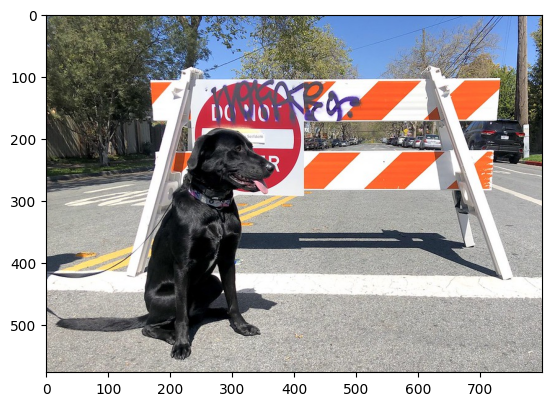
推論の実行#
result = compiled_model(input_image)[output_key]

result_index = np.argmax(result)
# openvino_notebooks ストレージからデータセットをダウンロード
image_filename = download_file(
"https://storage.openvinotoolkit.org/repositories/openvino_notebooks/data/data/datasets/imagenet/imagenet_2012.txt",
directory="data",
)
# 推論結果をクラス名に変換
imagenet_classes = image_filename.read_text().splitlines()
imagenet_classes[result_index]data/imagenet_2012.txt: 0%| | 0.00/30.9k [00:00<?, ?B/s]'n02099267 flat-coated retriever'タイミング
1,000 枚の画像の推論にかかる時間を測定します。これはパフォーマンスの指標となります。より正確なベンチマークを行うには、OpenVINO のベンチマーク・ツールを使用します。パフォーマンスを向上するには多くの最適化が可能であることに注意してください。
num_images = 1000

start = time.perf_counter()

for _ in range(num_images):
    compiled_model([input_image])

end = time.perf_counter()
time_ir = end - start

print(f"IR model in OpenVINO Runtime/CPU: {time_ir/num_images:.4f} " f"seconds per image, FPS: {num_images/time_ir:.2f}")
IR model in OpenVINO Runtime/CPU: 0.0011 seconds per image, FPS: 933.99