Optimum-Intel OpenVINO を使用した一貫性モデル#
この Jupyter ノートブックは、ローカルへのインストール後にのみ起動できます。

このノートブックでは、潜在的整合性モデル (LCM) を実行する方法について説明します。これにより、CPU や GPU などのインテルのハードウェア向けに最適化された標準 Hugging Face ディフューザー・パイプラインと Optimum Intel パイプラインを設定できます。CPU と GPU で推論を実行すると、提供されたプロンプトに対して画像を生成するパフォーマンスと時間を簡単に比較できます。このノートブックは、最小限の変更または変更なしで、他のインテル・ハードウェアでも利用できます。
Optimum Intel は、ディフューザーとトランスフォーマーのライブラリーと、インテル・ハードウェア上のパイプラインを高速化するためインテルが提供するさまざまなツール間との Hugging Face のインターフェイスです。Hugging Face でホストされているモデルの量子化を実行できます。このノートブックでは、OpenVINO が Optimum Intel のバックエンドとして AI 推論アクセラレーションに使用されています。
詳細については、Optimum Intel リポジトリー huggingface/optimum-intel を参照してください。
LCM は、潜在拡散モデル (Latent Diffusion Models - LDM) に続く次世代の生成モデルです。これらは、潜在的拡散モデル (LDM) の低速な反復サンプリング・プロセスを克服し、事前にトレーニングされた LDM (Stable Diffusion など) で最小限のステップ (2 ~ 4) で高速な推論を可能にするために提案されています。LCM の詳細については、https://latent-consistency-models.github.io/ を参照してください。
目次:
必要条件#
必要なパッケージをインストール
%pip install -q "openvino>=2023.3.0"
%pip install -q "onnx>=1.11.0" %pip install -q "optimum-intel[diffusers]@git+https://github.com/huggingface/optimum-intel.git" "ipywidgets" "torch>=2.1" "transformers>=4.33.0" --extra-index-url https://download.pytorch.org/whl/cpu
Note: you may need to restart the kernel to use updated packages.
Note: you may need to restart the kernel to use updated packages.
Note: you may need to restart the kernel to use updated packages.import warnings
warnings.filterwarnings("ignore")利用可能なデバイスの情報を表示#
available_devices プロパティーには、システム内で使用可能なデバイスが表示されます。ie.get_property() の “FULL_DEVICE_NAME” オプションはデバイスの名前を表示します。個別 GPU の ID 名を確認します。統合 GPU (iGPU) と専用 GPU (dGPU) がある場合、iGPU の場合は device_name="GPU.0"、dGPU の場合は device_name="GPU.1" と表示されます。"GPU" に割り当てられる iGPU または dGPU のいずれかのみがある場合。
注: OpenVINO を使用した GPU の詳細については、このリンクを参照してください。Ubuntu* 20.04 または Windows* 11 で問題が発生した場合は、このブログをご覧ください。
import openvino as ov

core = ov.Core()
devices = core.available_devices

for device in devices:
    device_name = core.get_property(device, "FULL_DEVICE_NAME")
print(f"{device}: {device_name}")CPU: Intel(R) Core(TM) i9-10920X CPU @ 3.50GHzLatentConsistencyModelPipeline を使用した CPU で完全精度モデル#
ここでは、Diffusers ライブラリーの潜在的一貫性モデル (LCM) の標準パイプラインが使用されます。詳細は、https://huggingface.co/docs/diffusers/en/api/pipelines/latent_consistency_models を参照してください
from diffusers import LatentConsistencyModelPipeline
import gc

pipeline = LatentConsistencyModelPipeline.from_pretrained("SimianLuo/LCM_Dreamshaper_v7")
2024-07-13 01:00:03.964344: I tensorflow/core/util/port.cc:110] oneDNN custom operations are on. You may see slightly different numerical results due to floating-point round-off errors from different computation orders. To turn them off, set the environment variable TF_ENABLE_ONEDNN_OPTS=0. 2024-07-13 01:00:04.000289: I tensorflow/core/platform/cpu_feature_guard.cc:182] This TensorFlow binary is optimized to use available CPU instructions in performance-critical operations. To enable the following instructions: AVX2 AVX512F AVX512_VNNI FMA, in other operations, rebuild TensorFlow with the appropriate compiler flags. 2024-07-13 01:00:04.671482: W tensorflow/compiler/tf2tensorrt/utils/py_utils.cc:38] TF-TRT Warning: Could not find TensorRT
Loading pipeline components...: 0%| | 0/7 [00:00<?, ?it/s]prompt = "A cute squirrel in the forest, portrait, 8k"
image = pipeline(prompt=prompt, num_inference_steps=4, guidance_scale=8.0, height=512, width=512).images[0]
image.save("image_standard_pipeline.png")
image0%| | 0/4 [00:00<?, ?it/s]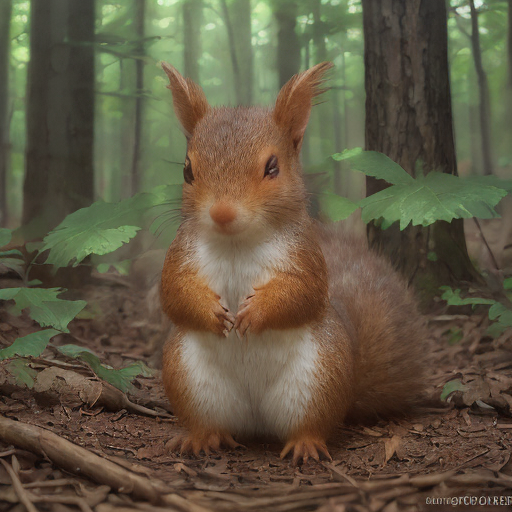
del pipeline
gc.collect();テキストから画像を生成する推論デバイスを選択#
import ipywidgets as widgets

core = ov.Core()

device = widgets.Dropdown(
    options=core.available_devices + ["AUTO"],
    value="CPU",
    description="Device:",
    disabled=False,
)

deviceDropdown(description='Device:', options=('CPU', 'AUTO'), value='CPU')Optimum Intel OVLatentConsistencyModelPipeline を使用した推論の実行#
OpenVINO バックエンドを備えた Intel Optimum を使用して LCM の推論を高速化します。詳細は、https://huggingface.co/docs/optimum/intel/inference#latent-consistency-models を参照してください。このノートブックの事前トレーニング済みモデルは、Hugging Face の FP32 精度で利用可能であり、CPU がデバイスとして選択された場合は、完全な精度で推論が実行されます。GPU アクセラレーション AI 推論は FP16 データタイプでサポートされており、GPU の FP32 精度ではメモリー・フットプリントとレイテンシーが高くなる可能性があります。したがって、OpenVINO の GPU のデフォルト精度は FP16 です。OpenVINO GPU プラグインは、即座に FP32 を FP16 に変換するため、手動で行う必要はありません。
from optimum.intel.openvino import OVLatentConsistencyModelPipeline
from pathlib import Path

if not Path("./openvino_ir").exists():
    ov_pipeline = OVLatentConsistencyModelPipeline.from_pretrained("SimianLuo/LCM_Dreamshaper_v7", height=512, width=512, export=True, compile=False)
    ov_pipeline.save_pretrained("./openvino_ir")
else:
    ov_pipeline = OVLatentConsistencyModelPipeline.from_pretrained("./openvino_ir", export=False, compile=False)

ov_pipeline.reshape(batch_size=1, height=512, width=512, num_images_per_prompt=1)
Framework not specified. Using pt to export the model. Keyword arguments {'subfolder': '', 'token': None, 'trust_remote_code': False} are not expected by StableDiffusionPipeline and will be ignored.Loading pipeline components...: 0%| | 0/7 [00:00<?, ?it/s]Using framework PyTorch: 2.3.1+cpuWARNING:tensorflow:Please fix your imports. Module tensorflow.python.training.tracking.base has been moved to tensorflow.python.trackable.base. The old module will be deleted in version 2.11.[ WARNING ] Please fix your imports. Module %s has been moved to %s. The old module will be deleted in version %s.
Using framework PyTorch: 2.3.1+cpu
Using framework PyTorch: 2.3.1+cpu
Using framework PyTorch: 2.3.1+cpuOVLatentConsistencyModelPipeline {
"_class_name": "OVLatentConsistencyModelPipeline",
"_diffusers_version": "0.24.0",
"feature_extractor": [
"transformers",
"CLIPImageProcessor"
],
"requires_safety_checker": true,
"safety_checker": [
"stable_diffusion",
"StableDiffusionSafetyChecker"
],
"scheduler": [
"diffusers",
"LCMScheduler"
],
"text_encoder": [
"optimum",
"OVModelTextEncoder"
],
"text_encoder_2": [
null,
null
],
"tokenizer": [
"transformers",
"CLIPTokenizer"
],
"unet": [
"optimum",
"OVModelUnet"
],
"vae_decoder": [
"optimum",
"OVModelVaeDecoder"
],
"vae_encoder": [
"optimum",
"OVModelVaeEncoder"
]
}ov_pipeline.to(device.value)
ov_pipeline.compile()Compiling the vae_decoder to CPU ...
Compiling the unet to CPU ...
Compiling the text_encoder to CPU ...
Compiling the vae_encoder to CPU ...prompt = "A cute squirrel in the forest, portrait, 8k"
image_ov = ov_pipeline(prompt=prompt, num_inference_steps=4, guidance_scale=8.0, height=512, width=512).images[0]
image_ov.save("image_opt.png")
image_ov0%| | 0/4 [00:00<?, ?it/s]
del ov_pipeline
gc.collect();