Hello 画像のセグメント化#
この Jupyter ノートブックはオンラインで起動でき、ブラウザーのウィンドウで対話型環境を開きます。ローカルにインストールすることもできます。次のオプションのいずれかを選択します:


OpenVINO™ でセグメント化モデルを使用する非常に基本的な入門編です。
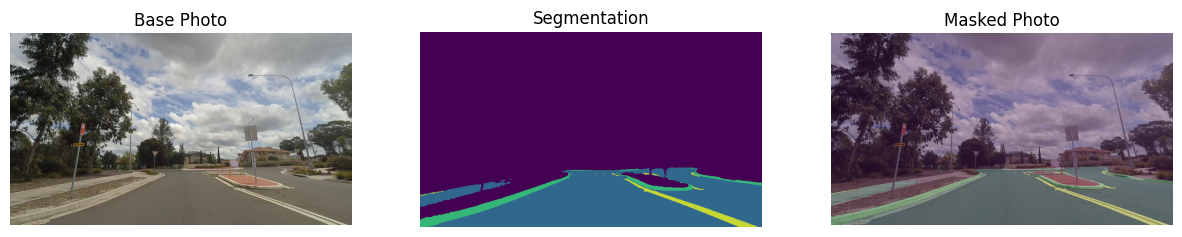
このチュートリアルでは、Open Model Zoo の事前トレーニング済みの road-segmentation-adas-0001 モデルを使用します。ADAS は、Advanced Driver Assistance Services の略です。モデルは、背景、道路、縁石、マークの 4 つのクラスを認識します。
目次:
import platform

# 必要なパッケージをインストール
%pip install -q "openvino>=2023.1.0" opencv-python tqdm

if platform.system() != "Windows": %pip install -q "matplotlib>=3.4"
else: %pip install -q "matplotlib>=3.4,<3.7"
Note: you may need to restart the kernel to use updated packages.
Note: you may need to restart the kernel to use updated packages.インポート#
import cv2
import matplotlib.pyplot as plt
import numpy as np
import openvino as ov

# `notebook_utils` モジュールを取得
import requests

r = requests.get( url="https://raw.githubusercontent.com/openvinotoolkit/openvino_notebooks/latest/utils/notebook_utils.py",
)

open("notebook_utils.py", "w").write(r.text)

from notebook_utils import segmentation_map_to_image, download_fileモデルの重みをダウンロード#
from pathlib import Path

base_model_dir = Path("./model").expanduser()

model_name = "road-segmentation-adas-0001"
model_xml_name = f"{model_name}.xml"
model_bin_name = f"{model_name}.bin"

model_xml_path = base_model_dir / model_xml_name

if not model_xml_path.exists():
    model_xml_url = (

"https://storage.openvinotoolkit.org/repositories/open_model_zoo/2023.0/models_bin/1/road-segmentation-adas-0001/FP32/road-segmentation-adas-0001.xml"
    )
    model_bin_url = (

"https://storage.openvinotoolkit.org/repositories/open_model_zoo/2023.0/models_bin/1/road-segmentation-adas-0001/FP32/road-segmentation-adas-0001.bin"
    )

    download_file(model_xml_url, model_xml_name, base_model_dir)
    download_file(model_bin_url, model_bin_name, base_model_dir)
else:
    print(f"{model_name} already downloaded to {base_model_dir}")
model/road-segmentation-adas-0001.xml: 0%| | 0.00/389k [00:00<?, ?B/s]model/road-segmentation-adas-0001.bin: 0%| | 0.00/720k [00:00<?, ?B/s]推論デバイスの選択#
OpenVINO を使用して推論を実行するためにドロップダウン・リストからデバイスを選択します
import ipywidgets as widgets

core = ov.Core()
device = widgets.Dropdown(
    options=core.available_devices + ["AUTO"],
    value="AUTO",
    description="Device:",
    disabled=False,
)

deviceDropdown(description='Device:', index=1, options=('CPU', 'AUTO'), value='AUTO')モデルのロード#
core = ov.Core()

model = core.read_model(model=model_xml_path)
compiled_model = core.compile_model(model=model, device_name=device.value)

input_layer_ir = compiled_model.input(0)
output_layer_ir = compiled_model.output(0)画像のロード#
Mapillary Vistas データセットのサンプル画像が提供されています。
# openvino_notebooks ストレージからイメージをダウンロード
image_filename = download_file(

"https://storage.openvinotoolkit.org/repositories/openvino_notebooks/data/data/image/empty_road_mapillary.jpg",
    directory="data",
)

# セグメンテーション・ネットワークでは、BGR 形式の画像が必要
image = cv2.imread(str(image_filename))

rgb_image = cv2.cvtColor(image, cv2.COLOR_BGR2RGB)
image_h, image_w, _ = image.shape

# N,C,H,W = バッチサイズ、チャネル数、高さ、幅。N, C, H, W = input_layer_ir.shape

# OpenCV resize では、デスティネーション・サイズが (幅、高さ) であると想定
resized_image = cv2.resize(image, (W, H))

# ネットワーク入力の形状に合わせて形状を変更
input_image = np.expand_dims(resized_image.transpose(2, 0, 1), 0)
plt.imshow(rgb_image)
data/empty_road_mapillary.jpg: 0%| | 0.00/227k [00:00<?, ?B/s]<matplotlib.image.AxesImage at 0x7f866f7dbac0>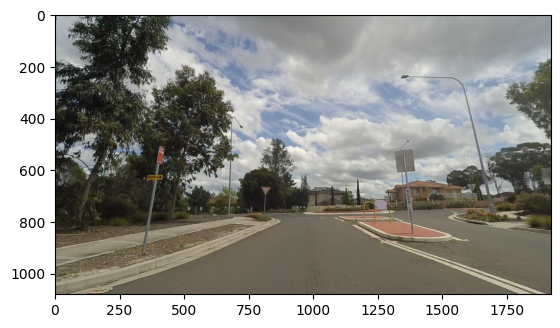
推論の実行#
# 推論を実行
result = compiled_model([input_image])[output_layer_ir]

# 視覚化のためにデータを準備
segmentation_mask = np.argmax(result, axis=1)
plt.imshow(segmentation_mask.transpose(1, 2, 0))<matplotlib.image.AxesImage at 0x7f86340753a0>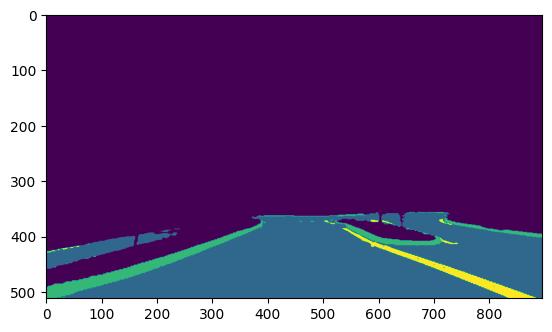
可視化のデータを準備#
# カラーマップを定義します。各色はクラスを表します
colormap = np.array([[68, 1, 84], [48, 103, 141], [53, 183, 120], [199, 216, 52]])

# 写真上のセグメンテーション・マスクの透明度を定義
alpha = 0.3

# notebook_utils.py 関数を使用して、マスクを RGB 画像に変換
mask = segmentation_map_to_image(segmentation_mask, colormap)
resized_mask = cv2.resize(mask, (image_w, image_h))

# マスク付きの画像を作成
image_with_mask = cv2.addWeighted(resized_mask, alpha, rgb_image, 1 - alpha, 0)データを可視化#
# 画像のタイトルを定義
data = {"Base Photo": rgb_image, "Segmentation": mask, "Masked Photo": image_with_mask}

# 画像を視覚化するためのサブプロットを作成
fig, axs = plt.subplots(1, len(data.items()), figsize=(15, 10))

# サブプロットを埋める
for ax, (name, image) in zip(axs, data.items()):
    ax.axis("off")
    ax.set_title(name)
    ax.imshow(image)

# 画像を表示
plt.show(fig)