Hello 画像分類#
この Jupyter ノートブックはオンラインで起動でき、ブラウザーのウィンドウで対話型環境を開きます。ローカルにインストールすることもできます。次のオプションのいずれかを選択します:


この OpenVINO™ の基本的な紹介では、画像分類モデルを使用して推論を行う方法を示します。
このチュートリアルでは、Open Model Zoo の事前トレーニングされた MobileNetV3 モデルが使用されます。OpenVINO IR モデルの作成方法の詳細については、TensorFlow モデルから OpenVINO への変換 チュートリアルを参照してください。
目次:
import platform

# openvino パッケージをインストール
%pip install -q "openvino>=2023.1.0" opencv-python tqdm

if platform.system() != "Windows":
     %pip install -q "matplotlib>=3.4"
else:
     %pip install -q "matplotlib>=3.4,<3.7"
Note: you may need to restart the kernel to use updated packages.インポート#
from pathlib import Path

import cv2
import matplotlib.pyplot as plt
import numpy as np
import openvino as ov

# `notebook_utils` モジュールを取得
import requests

r = requests.get(
url="https://raw.githubusercontent.com/openvinotoolkit/openvino_notebooks/latest/utils/notebook_utils.py",
)

open("notebook_utils.py", "w").write(r.text)

from notebook_utils import download_fileモデルとデータのサンプルをダウンロード#
base_artifacts_dir = Path("./artifacts").expanduser()

model_name = "v3-small_224_1.0_float"
model_xml_name = f"{model_name}.xml"
model_bin_name = f"{model_name}.bin"

model_xml_path = base_artifacts_dir / model_xml_name

base_url = "https://storage.openvinotoolkit.org/repositories/openvino_notebooks/models/mobelinet-v3-tf/FP32/"

if not model_xml_path.exists():
    download_file(base_url + model_xml_name, model_xml_name, base_artifacts_dir)
    download_file(base_url + model_bin_name, model_bin_name, base_artifacts_dir)
else:
    print(f"{model_name} already downloaded to {base_artifacts_dir}")
artifacts/v3-small_224_1.0_float.xml: 0%| | 0.00/294k [00:00<?, ?B/s]artifacts/v3-small_224_1.0_float.bin: 0%| | 0.00/4.84M [00:00<?, ?B/s]推論デバイスの選択#
OpenVINO を使用して推論を実行するためにドロップダウン・リストからデバイスを選択します
import ipywidgets as widgets

core = ov.Core()
device = widgets.Dropdown(
    options=core.available_devices + ["AUTO"],
    value="AUTO",
    description="Device:",
    disabled=False,
)

deviceDropdown(description='Device:', index=1, options=('CPU', 'AUTO'), value='AUTO')モデルのロード#
core = ov.Core()
model = core.read_model(model=model_xml_path)
compiled_model = core.compile_model(model=model, device_name=device.value)

output_layer = compiled_model.output(0)画像のロード#
# openvino_notebooks ストレージからイメージをダウンロード
image_filename = download_file(
    "https://storage.openvinotoolkit.org/repositories/openvino_notebooks/data/data/image/coco.jpg",
    directory="data",
)

# MobileNet モデルでは、RGB 形式の画像を想定
image = cv2.cvtColor(cv2.imread(filename=str(image_filename)), code=cv2.COLOR_BGR2RGB)

# MobileNet 画像の形状に合わせてサイズを変更
input_image = cv2.resize(src=image, dsize=(224, 224))

# 入力形状をモデル化するために形状を変更
input_image = np.expand_dims(input_image, 0)
plt.imshow(image);
data/coco.jpg: 0%| | 0.00/202k [00:00<?, ?B/s]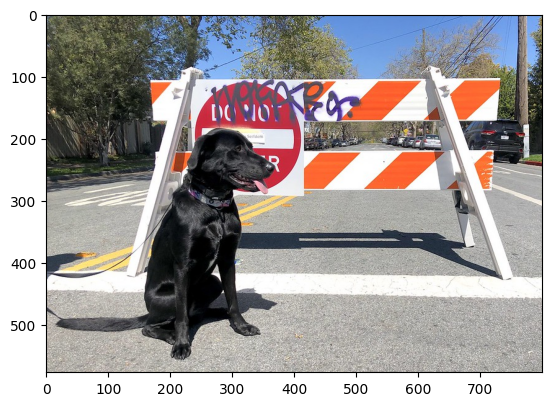
推論の実行#
result_infer = compiled_model([input_image])[output_layer]
result_index = np.argmax(result_infer)
imagenet_filename = download_file(
"https://storage.openvinotoolkit.org/repositories/openvino_notebooks/data/data/datasets/imagenet/imagenet_2012.txt",
directory="data",
)
imagenet_classes = imagenet_filename.read_text().splitlines()data/imagenet_2012.txt: 0%| | 0.00/30.9k [00:00<?, ?B/s]# モデルの説明には、このモデルの場合、クラス 0 は背景であると記載されています
# したがって、imagenet_classes の先頭に背景を追加する必要があります
imagenet_classes = ["background"] + imagenet_classes
imagenet_classes[result_index]'n02099267 flat-coated retriever'