OpenVINO TorchDynamo バックエンドによる Stable Diffusion v2.1#
この Jupyter ノートブックは、ローカルへのインストール後にのみ起動できます。

Stable Diffusion v2 は、Stability AI と LAION の研究者とエンジニアによって作成された、テキストから画像への潜在拡散モデルである Stable Diffusion の次世代モデルです。
一般に、拡散モデルは、画像などの対象サンプルを取得するために、ランダムなガウスノイズを段階的に除去するようにトレーニングされたマシン・ラーニング・システムです。拡散モデルは、画像データを生成するため最先端の結果を達成することが示されています。しかし、拡散モデルには、逆ノイズ除去プロセスが遅いという欠点があります。さらに、このモデルはピクセル空間で動作するため大量のメモリーを消費し、高解像度の画像を生成するには高いコストがかかります。そのため、このモデルをトレーニングし、推論に使用するのは困難です。OpenVINO は、インテルのハードウェア上でモデル推論を実行する機能を提供し、誰もが拡散モデルの素晴らしい世界への扉を開くことができます。
このノートブックでは、テキストから画像への変換および画像から画像への変換タスクで、Diffusers ライブラリーと OpenVINO TorchDynamo バックエンドを使用して stable diffusion モデルを実行する方法を示します。
これには次の手順が含まれます:
PyTorch モデルを使用してパイプラインを作成します。
OpenVINO TorchDynamo バックエンドを使用して OpenVINO 最適化を追加します。
OpenVINO を使用して Stable Diffusion パイプラインを実行します。
目次:
必要条件#
%pip install -q "torch>=2.2" transformers diffusers "gradio>=4.19" ipywidgets --extra-index-url https://download.pytorch.org/whl/cpu
%pip install -q "openvino>=2024.1.0"
Note: you may need to restart the kernel to use updated packages.Note: you may need to restart the kernel to use updated packages.import gradio as gr
import random
import torch
import time
from diffusers import StableDiffusionPipeline, StableDiffusionImg2ImgPipeline
import ipywidgets as widgets2024-07-13 04:01:03.234781: I tensorflow/core/util/port.cc:110] oneDNN custom operations are on.You may see slightly different numerical results due to floating-point round-off errors from different computation orders.To turn them off, set the environment variable TF_ENABLE_ONEDNN_OPTS=0. 2024-07-13 04:01:03.269549: I tensorflow/core/platform/cpu_feature_guard.cc:182] This TensorFlow binary is optimized to use available CPU instructions in performance-critical operations.To enable the following instructions: AVX2 AVX512F AVX512_VNNI FMA, in other operations, rebuild TensorFlow with the appropriate compiler flags.2024-07-13 04:01:03.796151: W tensorflow/compiler/tf2tensorrt/utils/py_utils.cc:38] TF-TRT Warning: Could not find TensorRT
Diffusers ライブラリーと Stable Diffusion#
Stable Diffusion v2.1 を動作するには、Hugging Face Diffusers ライブラリーを使用します。Stable Diffusion モデルを試すために、Diffusers は他の Diffusers パイプラインと同様に StableDiffusionPipeline と StableDiffusionImg2ImgPipeline を公開します。以下のコードは、stable-diffusion-2-1-base モデルを使用して StableDiffusionPipeline を作成する方法を示しています:
model_id = "stabilityai/stable-diffusion-2-1-base"

# テキストから画像を生成するパイプライン
pipe = StableDiffusionPipeline.from_pretrained(model_id, torch_dtype=torch.float32)
Loading pipeline components...: 0%| | 0/6 [00:00<?, ?it/s]The installed version of bitsandbytes was compiled without GPU support. 8-bit optimizers, 8-bit multiplication, and GPU quantization are unavailable.OpenVINO TorchDynamo バックエンド#
OpenVINO TorchDynamo バックエンドを使用すると、元の PyTorch スクリプトに最小限の変更を加えるだけで、PyTorch モデルの OpenVINO サポートを有効にすることができます。PyTorch コードを最適化されたカーネルに JIT コンパイルすることで、コードを高速化します: デフォルトでは、Torch コードは Eager モードで実行されますが、torch.compile を使用すると、次の手順が実行されます。
- グラフの取得 - モデルは、次のいずれかのサブグラフのブロックとして書き換えられます。
- TorchDynamo によってコンパイルされ “フラット化” されます。
- サポートされていない Python 構造 (制御フローコードなど) が原因で、eager モードにフォールバックします。
- グラフの下降 - すべての PyTorch 操作は、選択されたバックエンド固有のカーネル構成に分解されます。
- グラフのコンパイル - カーネルは、対応する低レベルのデバイス固有の操作を呼び出します。
推論用のデバイスを選択し、最初のアプリケーションの実行後に、最適化されたモデルファイルをハードドライブに保存するかどうかを有効または無効にします。これにより、次のアプリケーションの実行でそれらが使用できるようになり、推論のレイテンシーが短縮されます。利用可能な環境変数オプションの詳細を参照
import iopenvino as ov

core = ov.Core()
device = widgets.Dropdown(
    options=core.available_devices + ["AUTO"],
    value="CPU",
    description="Device:",
    disabled=False,
)

deviceDropdown(description='Device:', options=('CPU', 'AUTO'), value='CPU')model_caching = widgets.Dropdown(
options=[True, False],
value=True,
description="Model caching:",
disabled=False,
)
model_cachingDropdown(description='Model caching:', options=(True, False), value=True)torch.compile() メソッドを使用するには、import 文を追加して OpenVINO バックエンドを定義するだけです:
 # このインポートは torchdynamo の openvino バックエンドを活性化するのに必要
import openvino.torch # noqa: F401

pipe.unet = torch.compile(
    pipe.unet, }
    backend="openvino",
    options={"device": device.value, "model_caching": model_caching.value},
)

**Note**: Read more about available `OpenVINO
backends <https://docs.openvino.ai/2024/openvino-workflow/torch-compile.html#how-to-use>`__画像生成を実行#
prompt = "a photo of an astronaut riding a horse on mars"
image = pipe(prompt).images[0]
image
0%| | 0/50 [00:00<?, ?it/s]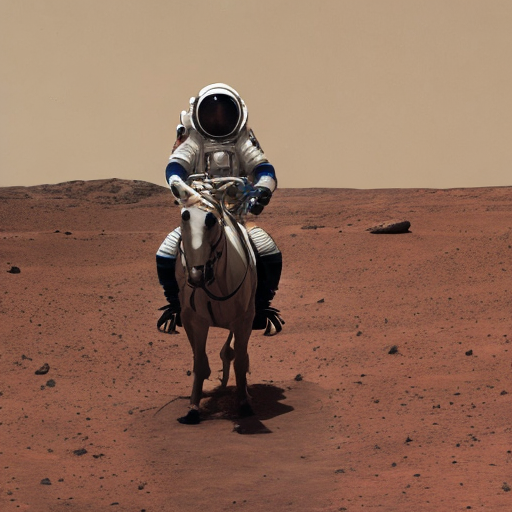
インタラクティブなデモ#
これで、デモを開始し、推論モードを選択し、プロンプト (および Image-to-Image 生成用の入力画像) を定義し、推論パイプラインを実行できます。オプションで、いくつかの入力パラメーターを変更することもできます。
time_stamps = []

def callback(iter, t, latents):
    time_stamps.append(time.time())

def error_str(error, title="Error"):
    return (
        f"""#### {title}
            {error}"""
        if error
        else ""
    )

def on_mode_change(mode):
    return gr.update(visible=mode == modes["img2img"]), gr.update(visible=mode == modes["txt2img"])

def inference(
    inf_mode,
    prompt,
    guidance=7.5,
    steps=25,
    width=768,
    height=768,
    seed=-1,
    img=None,
    strength=0.5,
    neg_prompt="",
):
    if seed == -1:
        seed = random.randint(0, 10000000)
    generator = torch.Generator().manual_seed(seed)
    res = None

    global time_stamps, pipe
    time_stamps = []
    try:
        if inf_mode == modes["txt2img"]:
            if type(pipe).__name__ != "StableDiffusionPipeline":
                pipe = StableDiffusionPipeline.from_pretrained(model_id, torch_dtype=torch.float32)
                pipe.unet = torch.compile(pipe.unet, backend="openvino")
            res = pipe(
                prompt,
                negative_prompt=neg_prompt,
                num_inference_steps=int(steps),
                guidance_scale=guidance,
                width=width,
                height=height,
                generator=generator,
                callback=callback,
                callback_steps=1,
            ).images
        elif inf_mode == modes["img2img"]:
            if img is None:
                return (
                    None,
                    None,
                    gr.update(
                        visible=True,
                        value=error_str("Image is required for Image to Image mode"),
                    ),
                )
            if type(pipe).__name__ != "StableDiffusionImg2ImgPipeline":
                pipe = StableDiffusionImg2ImgPipeline.from_pretrained(model_id, torch_dtype=torch.float32)
                pipe.unet = torch.compile(pipe.unet, backend="openvino")
            res = pipe(
                prompt,
                negative_prompt=neg_prompt,
                image=img,
                num_inference_steps=int(steps),
                strength=strength,
                guidance_scale=guidance,
                generator=generator,
                callback=callback,
                callback_steps=1,
            ).images
    except Exception as e:
        return None, None, gr.update(visible=True, value=error_str(e))

    warmup_duration = time_stamps[1] - time_stamps[0]
    generation_rate = (steps - 1) / (time_stamps[-1] - time_stamps[1])
    res_info = "Warm up time: " + str(round(warmup_duration, 2)) + " secs "
    if generation_rate >= 1.0:
        res_info = res_info + ", Performance: " + str(round(generation_rate, 2)) + " it/s "
    else:
        res_info = res_info + ", Performance: " + str(round(1 / generation_rate, 2)) + " s/it "

    return (
        res,
        gr.update(visible=True, value=res_info),
        gr.update(visible=False, value=None),
    )

modes = {
    "txt2img": "Text to Image",
    "img2img": "Image to Image",
}

with gr.Blocks(css="style.css") as demo:
    gr.HTML(
        f"""
            Model used: {model_id}
        """
    )
    with gr.Row():
        with gr.Column(scale=60):
            with gr.Group():
                prompt = gr.Textbox(
                    "a photograph of an astronaut riding a horse",
                    label="Prompt",
                    max_lines=2,
                 )
                neg_prompt = gr.Textbox(
                    "frames, borderline, text, character, duplicate, error, out of frame, watermark, low quality, ugly, deformed, blur",
                    label="Negative prompt",
                )
                res_img = gr.Gallery(label="Generated images", show_label=False) error_output = gr.Markdown(visible=False)

            with gr.Column(scale=40):
                generate = gr.Button(value="Generate")

                with gr.Group():
                    inf_mode = gr.Dropdown(list(modes.values()), label="Inference Mode", value=modes["txt2img"])

                    with gr.Column(visible=False) as i2i:
                        image = gr.Image(label="Image", height=128, type="pil")
                        strength = gr.Slider(
                            label="Transformation strength",
                            minimum=0,
                            maximum=1,
                            step=0.01,
                            value=0.5,
                        )

            with gr.Group():
                with gr.Row() as txt2i:
                    width = gr.Slider(label="Width", value=512, minimum=64, maximum=1024, step=8)
                    height = gr.Slider(label="Height", value=512, minimum=64, maximum=1024, step=8)

                with gr.Group():
                    with gr.Row():
                        steps = gr.Slider(label="Steps", value=20, minimum=1, maximum=50, step=1)
                        guidance = gr.Slider(label="Guidance scale", value=7.5, maximum=15)

                seed = gr.Slider(-1, 10000000, label="Seed (-1 = random)", value=-1, step=1)

            res_info = gr.Markdown(visible=False)

    inf_mode.change(on_mode_change, inputs=[inf_mode], outputs=[i2i, txt2i], queue=False)

    inputs = [
        inf_mode,
        prompt,
        guidance,
        steps,
        width,
        height,
        seed,
        image,
        strength,
        neg_prompt,
    ]

    outputs = [res_img, res_info, error_output]
    prompt.submit(inference, inputs=inputs, outputs=outputs)
    generate.click(inference, inputs=inputs, outputs=outputs)

try:
    demo.queue().launch(debug=False)
except Exception:
    demo.queue().launch(share=True, debug=False)

# リモートで起動する場合は、server_name と server_port を指定
# demo.launch(server_name='your server name', server_port='server port in int')
# 詳細については、ドキュメントをご覧ください: https://gradio.app/docs/
ローカル URL で実行中: http://127.0.0.1:7860 パブリックリンクを作成するには、launch() で share=True を設定します。
Automatic1111 Stable Diffusion WebUI のサポート#
Automatic1111 Stable Diffusion WebUI は、Stable Diffusion ベースの画像生成用のブラウザーベースのインターフェイスをホストするオープンソース・リポジトリーです。これにより、ユーザーはテキストプロンプトから現実的で創造的な画像を作成できます。Stable Diffusion WebUI は、OpenVINO torch.compile 機能を活用することにより、インテル® CPU、統合およびディスクリートのインテル® GPU でサポートされます。詳しい手順は、Stable Diffusion WebUI リポジトリーで入手できます。